Skip to content
SPURT.

By Spurt Studios · Bengaluru

Billing & inventory software for shopsSpurt POS

Your whole shop. One screen.

  • Billing
  • Stock
  • WhatsApp
  • AI summary
  • Loyalty
  • GST

In use at Nekara Silks · onboarding our first shops in Bengaluru.

Spurt POS is billing and inventory software for shops, showrooms and godowns, built by Spurt Studios in Bengaluru. GST bills, stock by the piece, bills on WhatsApp, loyalty points and udhaar sit on one screen, and it keeps billing when the internet drops. A saree showroom uses it today; we fit it to your shop and train your staff.

Our launch film · Kannada & English, captions on screen · demo shop and figures

Every morning, on your phone

You don’t have to open the shop to know how it did. Every morning Spurt POS sends the owner a short summary of yesterday on WhatsApp, in plain words, worked out from your own bills, stock and day close.

Yesterday’s sales
The total, and the number of bills it came from.
Top seller
What sold best yesterday.
What is running low
Pieces that sell well and are nearly gone, before a customer asks for one.
Cash difference
Whether the cash counted at day close matched what the drawer should hold.
Your shopDaily summary · Spurt POS

Today · 7:00 am

Good morning! Yesterday:

₹1,84,000

46 bills

Top sellerMysore silk
Running lowPink Kanchipuram · 2 left
Cash difference₹0 · counted matches

Demo shop and figures, from our launch film

At the counter

Scan it, bill it, send it to her WhatsApp.

Shop Wi-Fi offline · still billing

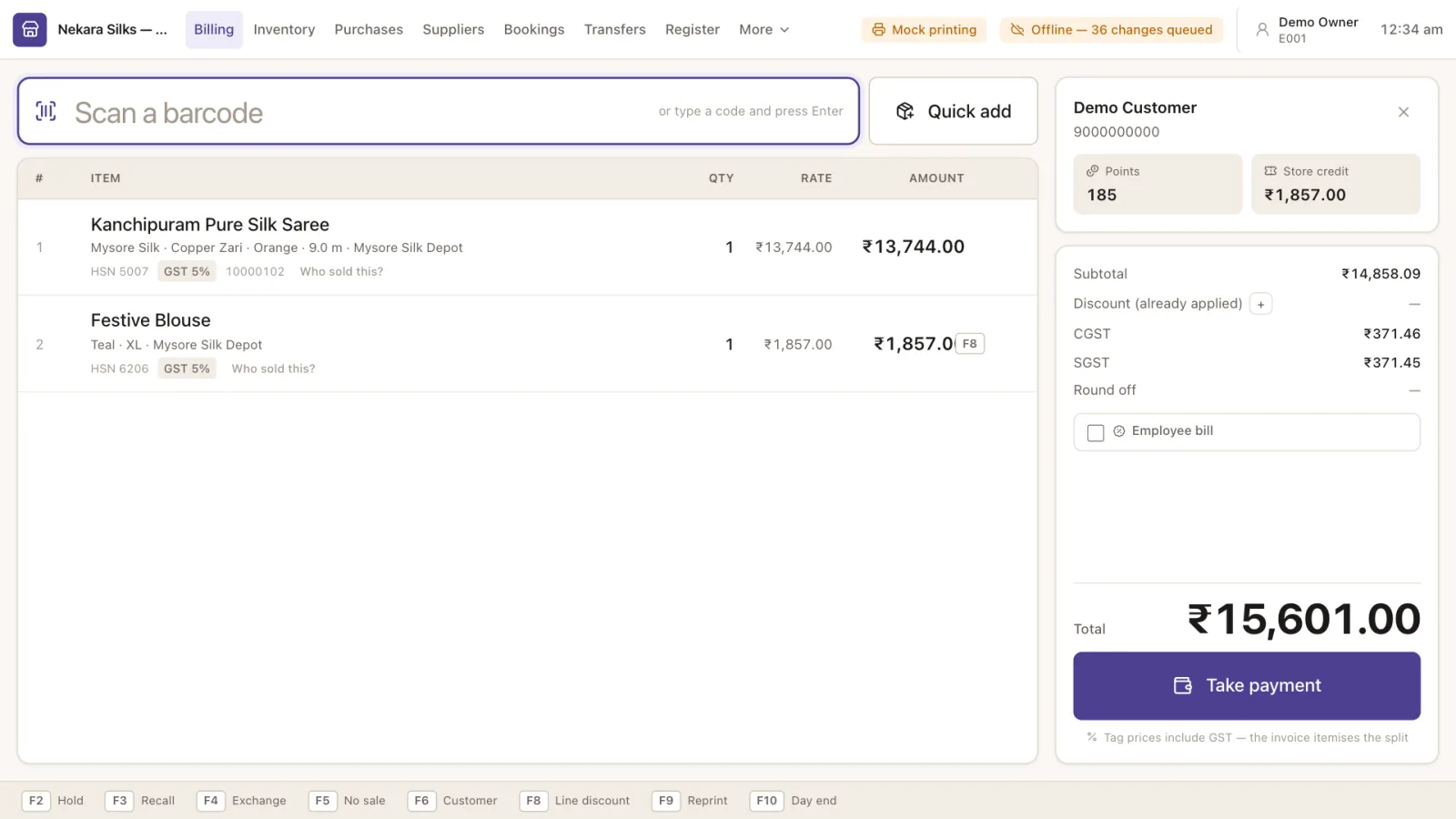
One screen for the whole sale. Scan the tag, find the customer by phone, take cash, card, UPI or udhaar, and print the bill or send it to her WhatsApp. GST is worked out on every line, with its HSN code.

Spurt POS billing screen: a scanned silk saree and blouse on the bill, each with its HSN code and 5% GST, and the CGST/SGST split beside the total
01 / 04

Scan, bill, take payment

One screen for the whole sale. Scan the tag, find the customer by phone, take the money.

  • Barcode and tag scanning
  • HSN code and GST rate on every line
  • Cash, card, UPI or credit
  • Receipt printed, cash drawer opens
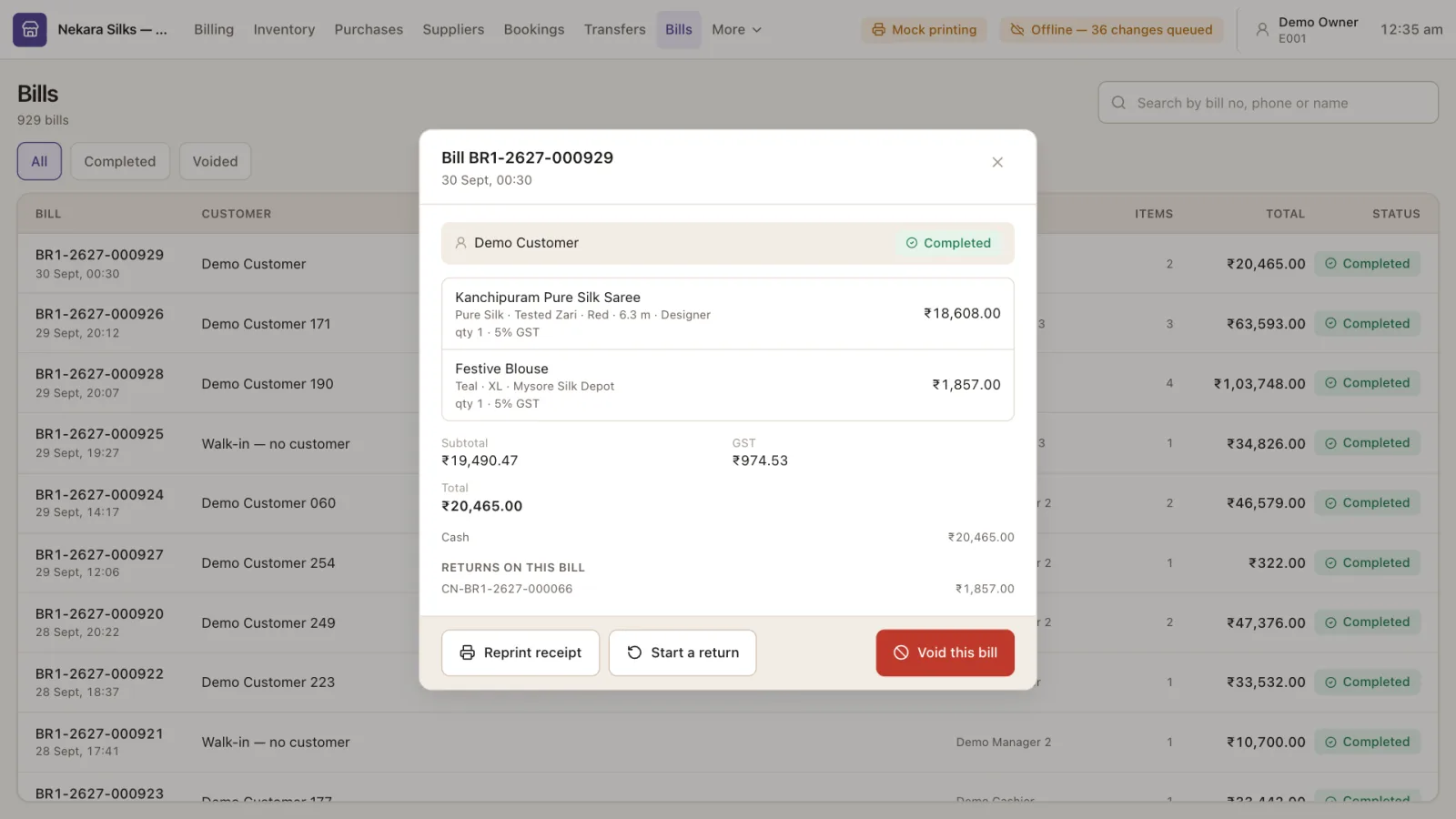
Spurt POS bills list with one bill open, showing its items, GST, the return linked to it, and buttons to reprint, start a return or void the bill
02 / 04

Voids, returns and exchanges

Every return starts from the original bill, so nothing goes back that wasn’t sold.

  • Find any bill by number, phone or name
  • Void a bill with a reason
  • Returns and exchanges with credit notes
  • Settle as a refund or store credit
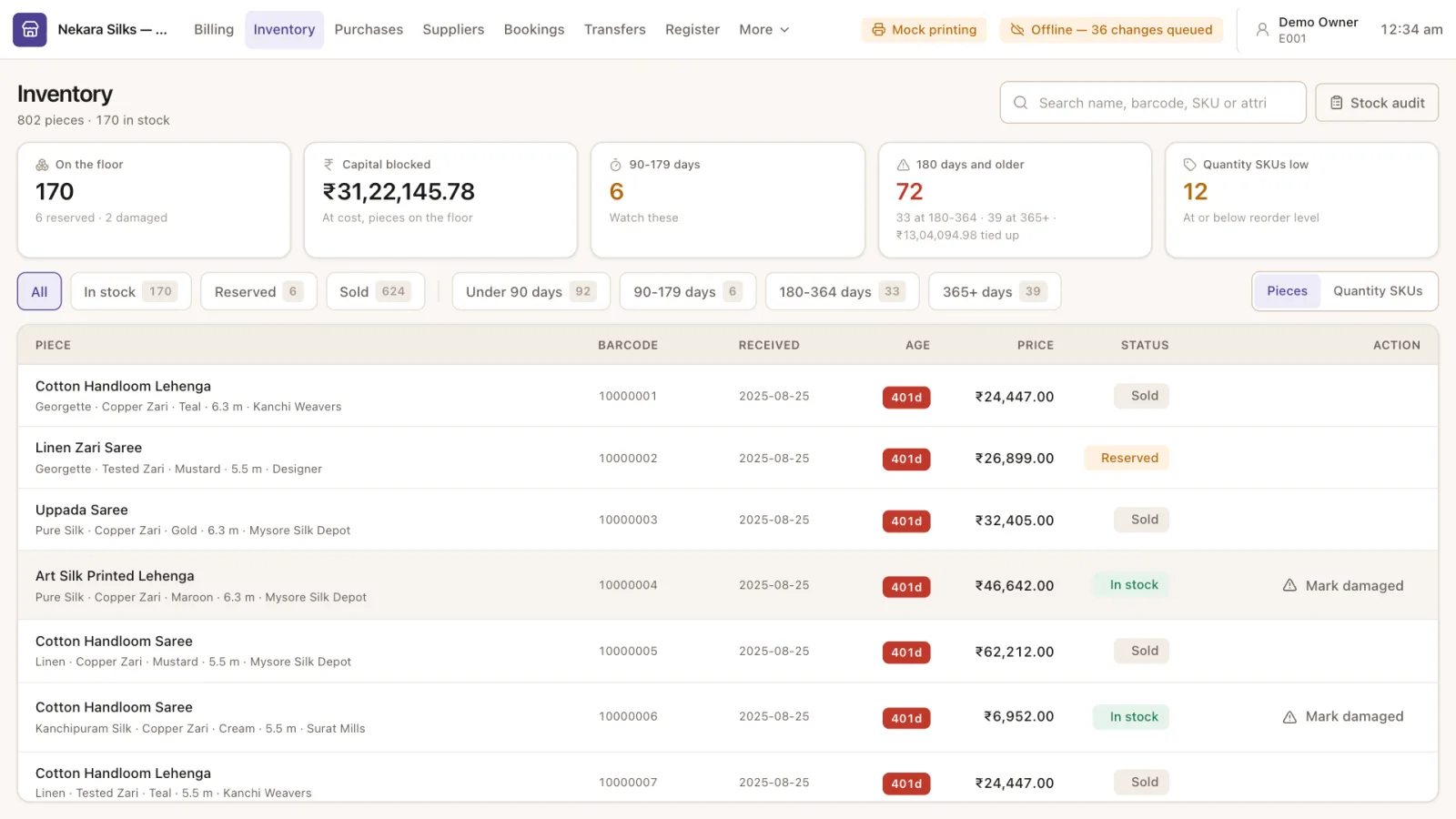
Spurt POS inventory: one row per saree with its barcode, date received, price and status — in stock, reserved or sold
03 / 04

Stock, one piece at a time

One-off pieces and counted stock live side by side, and staff scan both the same way.

  • Goods receipt creates barcoded stock
  • Tag printing queued per piece
  • Bookings hold a piece against an advance
  • In stock, reserved or sold — at a glance
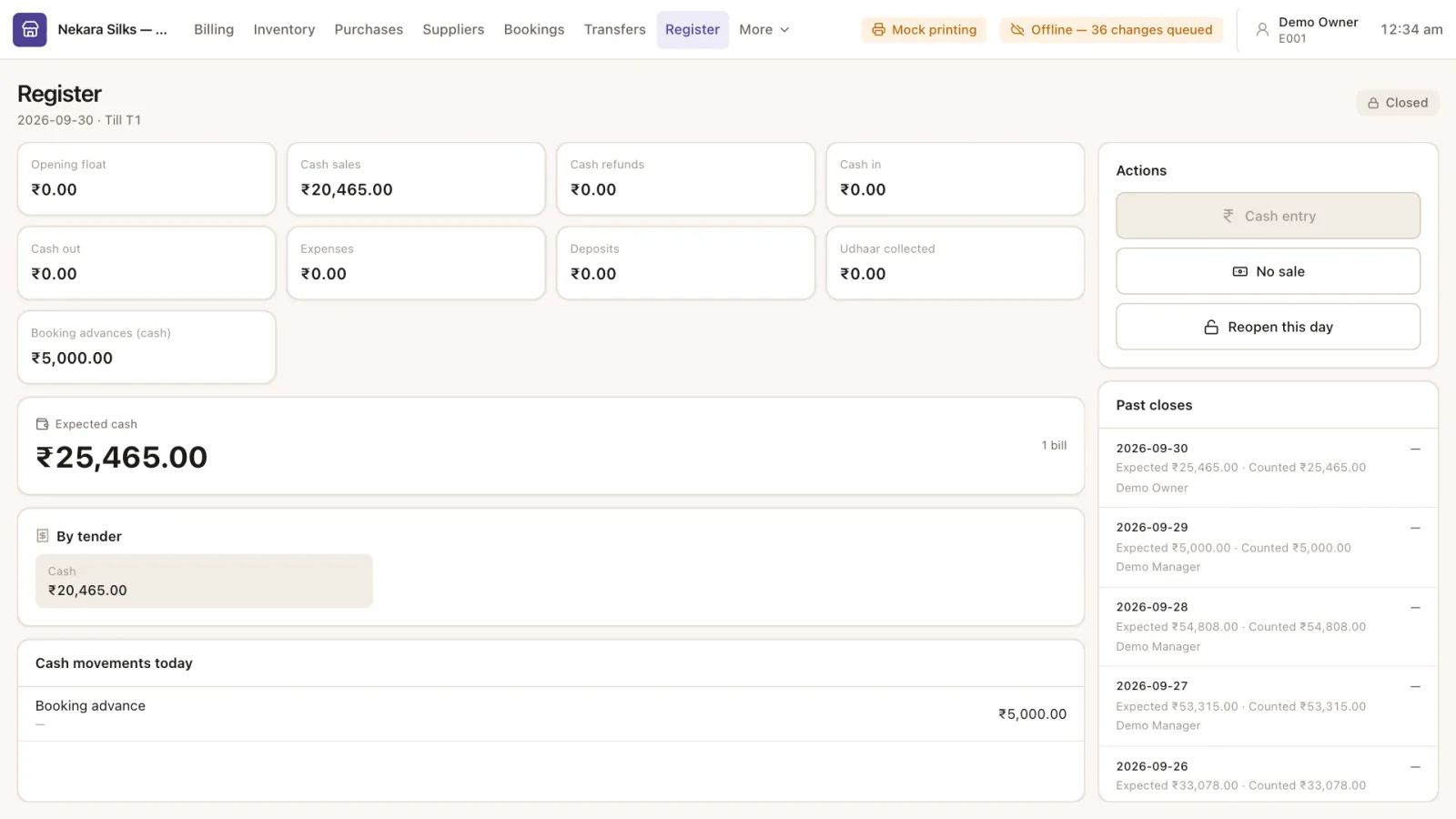
Spurt POS register: expected cash in the drawer, sales by tender, cash movements for the day and a list of past day closes
04 / 04

Close the day with a count

The register shows what the drawer should hold. Count it, enter it, and the day closes.

  • Expected cash worked out for you
  • Cash count and Z-report
  • Booking advances in the register
  • Past closes kept for checking

Real Spurt POS screens, from a demo copy with sample data

Lost-sale capture

  1. 01

    When she walks out without buying

    Staff record what she wanted, her budget and why she didn’t buy, in a few taps, and set a follow-up. So you know what your customers need from you, and you can go back to them.

  2. 02

    When it isn’t in stock

    Staff book her request for the item. When that item is back in stock, Spurt POS sends her a WhatsApp message to say it is available.

Lost-sale capture

Spurt POS

Customer left without buying

1 · What she wanted

  • Pink Kanchipuram
  • Mysore silk
  • Cotton

2 · Her budget

  • Under ₹10K
  • ₹10–20K
  • Above ₹20K

3 · Why she didn’t buy

  • Price
  • Design
  • Colour
  • Not in stock

Saved, with a follow-up

Waiting for this item

Royal blue Mysore silk

  • MeeraAsked for it
  • LakshmiBooked it
  • AnithaAsked for it

WhatsApp sent when it is back in stock

Your shop

Hi Meera! The royal blue Mysore silk you asked for is back in stock. Visit us or reply here to book it.

Demo customer and figures, from our launch film

Spurt POS

Counter 1

Points

500

Meera · welcome points

Udhaar

₹3,200

Due Friday · reminder sent

GST

5% · 18%

Picked on every line

Day-end cash

₹14,750

Expected = counted

Demo figures, from our launch film

Customers come back

  • Loyalty points

    Customers earn points on every bill and spend them on the next one.

  • Udhaar, with reminders

    Sell on credit to customers you trust. Spurt POS keeps the ledger and reminds them when it falls due.

  • Bills on WhatsApp

    The bill goes to the customer’s WhatsApp, so it is never lost and your number is saved.

  • GST on every line

    5% on the saree, 18% on the item that needs it. Picked per line, split into CGST and SGST.

  • Day-end cash

    The register works out what the drawer should hold. Count it, and the day closes.

Switch on what your shop needs.

Built into Spurt POS and set up per shop. On the demo we’ll show you which ones fit.

  • Promotions & coupons
  • Gift cards
  • Loyalty
  • Deep reports
  • Staff attendance
  • GST returns export
  • WhatsApp receipts
  • Tally export
  • Label & tag printers
  • Kannada & Hindi
  • Fabric by the metre
  • Consignment stock
  • Owner approval codes
  • Floor billing on a phone
  • A second counter

Offline-first billing software

Every bill is saved on the counter PC first, so a broadband cut never stops a sale. Once you’re back online it syncs to the cloud on its own, about every 30 seconds.

  1. 01 · Counter PC

    Bills saved here first

    With or without internet

  2. 02 · Cloud copy

    Synced about every 30 s

    Whenever the shop is online

  3. 03 · Owner’s phone

    Today’s sales, anywhere

    Read from the cloud copy

Bills are saved on the counter PC first, synced to a cloud copy about every 30 seconds when online, and the owner sees the day’s sales on a phone.
  • Owner dashboard on your phone

    The day’s sales from the cloud copy, on any phone, installed like an app.

  • More counters, same shop

    Extra counters open Spurt POS in a browser over the shop’s own network.

  • Hourly backups

    The till backs itself up every hour, and a backup can be restored.

  • 2,814 automated tests

    Billing, GST, returns and stock are covered by automated checks, plus 122 browser tests on the production build.

Who it’s for

Any shop that sells from stock.

A saree showroom uses Spurt POS today, but nothing in it is specific to sarees. If you bill at a counter and keep stock in a shop, showroom or godown, it can run your day.

  • Saree & silk showrooms

    In use at Nekara Silks

    Each saree billed as its own barcoded piece, with bookings against an advance, weavers’ consignment stock and fabric sold by the metre.

  • Garment & ready-made clothing shops

    A tag on every piece, the GST rate picked per line, returns and exchanges from the original bill, and loyalty points for regulars.

  • Footwear shops

    Scan each pair to bill it, take returns and exchanges against the original bill, and see what is running low in the morning summary.

  • Wholesale godowns & distributors

    GST invoices with HSN codes, stock booked in on a goods receipt, udhaar with due-date reminders, and GSTR-1 and Tally export for your accountant.

  • Hardware & electrical stores

    Scan to bill items at different GST rates, sell on credit to regular customers with reminders when it falls due, and keep an eye on low stock.

  • Mobile & electronics shops

    Every piece barcoded and billed with its HSN code, the bill sent to the customer’s WhatsApp, and returns and exchanges from the original bill.

  • Gift, toy & stationery shops

    Quick scan-and-bill at a busy counter, coupons, gift cards and loyalty points, and a morning note on what is running low.

  • Furniture & home stores

    Book a piece against an advance, bill it with GST, and see what has sat in the showroom or godown too long.

  • Something else that sells from stock? We fit Spurt POS to your shop.

    Tell us about your shop

Need weighing, expiry dates or table orders? Tell us — we build custom software too.

Inventory, not just billing.

The bill and the stock are one record, so the count is right when the sale is made.

Stock per piece
Goods receipt creates a barcoded record for each piece. It shows as in stock, reserved or sold.
Low stock, each morning
What is running low is in the owner’s summary on WhatsApp, before a customer asks for it.
Stuck stock
The owner app’s ageing report shows what has sat unsold too long, and the money it holds.
Consignment and by the metre
Weavers’ pieces owed only once sold, and fabric sold by length at a price per metre.

How we set you up

From first call to first bill.

Spurt POS isn’t a download. We fit it to your shop, install it at your counter and train your staff, and after that you deal with the people who built it.

  1. Step 1

    Request a quote

    Tell us what you sell and how many counters you run.

  2. Step 2

    Live demo on a call

    We run Spurt POS for you and answer every question.

  3. Step 3

    Your quote

    A quote for your set-up: counters, modules, hardware and training.

  4. Step 4

    Visit and configure

    Products, GST rules, receipts and your existing data, set up for your shop.

  5. Step 5

    Install and train

    Installed on your counter PC, hardware connected, staff trained at the till.

  6. Step 6

    Go live, then explore

    Bill from the first day. Explore the rest of Spurt POS at your own pace.

Hardware it works with.

Already own a scanner or printer? Send us the models and we’ll check them before we quote.

Counter PC
A Windows PC. Spurt POS runs on it and opens in the browser.
Barcode scanner
Tested with the Zebra DS2208.
Receipt printer
Tested with the Epson TM-T82X-II.
Cash drawer
Opens through the receipt printer when a sale is paid.
Extra counters
Any computer on the shop’s network, in a browser.
Owner’s phone
Any modern phone, for the dashboard.
Tag printer
Configured on request with the label & tag printers module.

In use

Nekara Silks is a silk-saree showroom in Chandra Layout, Bengaluru. Every saree there is a one-off piece with its own price, while blouses are counted stock, and Spurt POS bills both at the same counter. We’re now onboarding our first shops across Bengaluru.

The Spurt POS counter, as set up for Nekara Silks · demo data

FAQ

Spurt POS billing software: common questions

What is Spurt POS?

Spurt POS is billing and inventory software for shops, showrooms and godowns, built and owned by Spurt Studios in Bengaluru. It handles GST billing with HSN codes, barcode stock by the piece, returns, loyalty points, udhaar and the day-end cash count, sends bills on WhatsApp and keeps billing when the internet drops. We install it at your counter and train your staff.

Does Spurt POS work as offline billing software?

Yes. Every bill is saved on the counter PC first, and staff sign in with a PIN that is checked on the till, so a broadband cut doesn’t stop billing. When the connection returns, Spurt POS syncs to the cloud on its own, about every 30 seconds. Only the owner’s phone dashboard and WhatsApp messages need the internet.

Is Spurt POS GST billing software? Does it make GST invoices?

Yes. Each item carries its HSN code and GST rate, so a 5% saree and an 18% item can sit on the same bill, and every GST invoice splits the tax into CGST and SGST. Rates live in a table set once per product category, so when your CA advises a change it becomes a setting, not a software update. A GSTR-1 export for filing returns can be switched on.

Is Spurt POS billing software for a retail shop like mine?

Very likely, if you sell from stock: saree, garment, footwear, hardware, electronics, gift and furniture shops, and wholesale godowns. It is in use at Nekara Silks, a saree showroom in Chandra Layout, Bengaluru. Tell us what you sell and how your counter works, and we’ll say plainly whether Spurt POS fits before you spend anything.

Is Spurt POS only for saree shops?

No. A saree showroom is where it is in use today, but Spurt POS is built for any shop, showroom or godown that bills and keeps stock: clothing, footwear, hardware, electronics, gifts, furniture and more. If you need weighing scales, expiry dates or table orders, tell us: we build custom software too.

Can I use Spurt POS for a wholesale godown or distributor?

Yes. Spurt POS bills with GST and HSN codes, books stock in on a goods receipt, tracks every piece by barcode, sells on credit with udhaar and due-date reminders, and exports GSTR-1 and Tally files. The owner’s phone dashboard and morning summary show what is selling and what is running low. Tell us how your godown works and we’ll confirm the fit on a demo.

Does Spurt POS track inventory with barcodes?

Yes. Inventory and billing share one record. When stock arrives, the goods receipt creates a barcoded entry for each piece and queues its tag for printing; at the counter, staff scan the tag, take cash, card, UPI or udhaar and print the receipt. Every piece shows as in stock, reserved or sold, and counted stock like blouses scans the same way.

Can Spurt POS send bills and reminders on WhatsApp?

Yes. Spurt POS can send the bill to the customer’s WhatsApp, remind customers when udhaar is due, tell a customer when an item she asked for is back in stock, and send the owner a short summary of yesterday every morning: sales, bills, top seller, what is running low and any cash difference. Messages go out from your shop’s own WhatsApp Business number, which we help you set up, and only to customers who agreed to hear from you.

What hardware does Spurt POS need?

A Windows PC at the counter, a barcode scanner and a receipt printer with a cash drawer. We have tested it with the Zebra DS2208 scanner and the Epson TM-T82X-II printer. Extra counters can be any computer on the shop’s network, and tag printers are set up on request. If you already own hardware, send us the models and we’ll check them before quoting.

How much does Spurt POS cost, and can I see it first?

Every install is quoted, because the cost depends on how many counters you run, the hardware you need, the modules you switch on and the data we bring across. There is no price list. Book a live demo first: we run Spurt POS for you on a call with products like yours, then send a quote for your shop before any work starts.

Book a live demo

Tell us what you sell and how many counters you run. A founder shows you Spurt POS live on a call, then sends a quote for your shop.